|
Previous
|
Up
|
Next
| |
Mouse Support |
General Concepts |
Customizing Epsilon's Menu |
Epsilon User's Manual and Reference >
General Concepts >
The Menu Bar
The Windows GUI version of Epsilon provides a customizable menu bar
and tool bar. To modify the menu bar, edit the file gui.mnu. See the
next section for details. You can turn it off by adding
(set-gui-menu 0) to your einit.ecm file (see Command Files). To modify the tool bar, you can redefine the EEL
command standard-toolbar in the file menu.e.
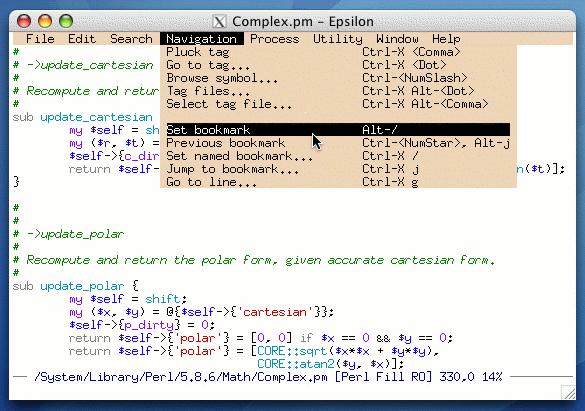
Other versions of Epsilon provide a text-based menu bar, which is
hidden by default. Most of the customization variables described
below only apply to the text-based menu bar.
You can have Epsilon display a menu bar all the time
with the toggle-menu-bar command, or press Alt-F2 (the
show-menu command) to display it at any time, and hide it again
after you select a command. When you use the menu bar to invoke a
command that needs additional input, Epsilon automatically brings up a
list of options (as if you typed "?") so that you can select one
without using the keyboard.
You can change the contents of the menu bar by editing the appropriate
.mnu file. See the next section.
If you hold down the Shift or Ctrl keys while selecting a menu
command, Epsilon will run the command with a numeric argument of 1.
This is handy for commands that behave differently when given a
numeric argument. When you select an item on the text-based menu bar,
Epsilon flashes the selected item. The menu-bar-flashes
variable holds the number of flashes (default two).
By default, Epsilon displays key bindings for menu items. Set the
variable menu-bindings to zero to disable this feature.
(Epsilon for Windows ignores this variable and always displays such
bindings.) Epsilon computes bindings dynamically the first time it
displays a particular menu column. (For several commands with
multiple bindings, the menu file selects a particular binding
to display.) The rebuild-menu command makes Epsilon reconstruct
its menus: use this command after setting menu-bindings or
editing and saving a menu file.
By default, when you click on the text-based menu bar but release the
mouse without selecting a command, Epsilon leaves the menu displayed
until you click again. Set the menu-stays-after-click variable
to zero if you want Epsilon to remove the menu when this happens.
|
Previous
|
Up
|
Next
| |
Mouse Support |
General Concepts |
Customizing Epsilon's Menu |

 Epsilon Programmer's Editor 14.04 manual. Copyright (C) 1984, 2021 by Lugaru Software Ltd. All rights reserved.
|